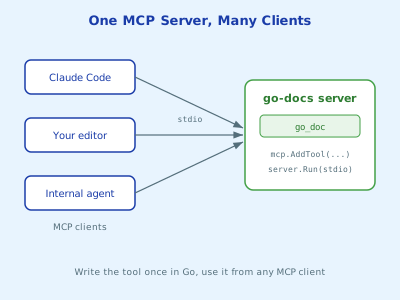
The Model Context Protocol lets you write a tool once and use it from any AI client that speaks MCP. Here’s how to build one in Go.
Estimated Reading Time : 8m
Why MCP exists
In the last post, the tool lived inside the same program as the model loop. That works, but it doesn’t travel. If you want the same get_pod_status tool in Claude Code, in your editor, and in an internal chatbot, you’d have to reimplement it three times.
MCP separates the two halves:
- An MCP server exposes tools (and a few other things, covered in a later post)
- An MCP client, which lives inside an AI application, discovers those tools and calls them on the model’s behalf
The protocol is JSON-RPC over a transport. For local servers the transport is usually stdio: the client starts your server as a subprocess and talks to it over stdin and stdout.
The Go SDK
The official Go SDK is the module github.com/modelcontextprotocol/go-sdk:
go get github.com/modelcontextprotocol/go-sdk
Everything you need for this post is in its mcp package, which you import as github.com/modelcontextprotocol/go-sdk/mcp. That’s a Go import path, not a web address. The package docs are on pkg.go.dev.
A useful first server
Toy examples are easy to forget, so let’s build something worth keeping: a server that lets an AI client read Go documentation with go doc. When the model is unsure about an API, it can look it up instead of guessing.
package main

import (
    "context"
    "fmt"
    "log"
    "os/exec"
    "strings"

    "github.com/modelcontextprotocol/go-sdk/mcp"
)

type DocInput struct {
    Query string `json:"query" jsonschema:"package or symbol to look up, e.g. net/http.Client or strings.Cut"`
}

type DocOutput struct {
    Doc string `json:"doc" jsonschema:"the documentation printed by go doc"`
}

func goDoc(ctx context.Context, req *mcp.CallToolRequest, in DocInput) (*mcp.CallToolResult, DocOutput, error) {
    // A query starting with "-" would be parsed as a flag to go doc.
    if in.Query == "" || strings.HasPrefix(in.Query, "-") {
        return nil, DocOutput{}, fmt.Errorf("invalid query %q", in.Query)
    }

    out, err := exec.CommandContext(ctx, "go", "doc", in.Query).CombinedOutput()
    if err != nil {
        return nil, DocOutput{}, fmt.Errorf("go doc %s: %s", in.Query, out)
    }
    return nil, DocOutput{Doc: string(out)}, nil
}

func main() {
    server := mcp.NewServer(&mcp.Implementation{Name: "go-docs", Version: "v0.1.0"}, nil)

    mcp.AddTool(server, &mcp.Tool{
        Name: "go_doc",
        Description: "Look up documentation for a Go package or symbol. " +
            "Use this before writing code against an API you are not certain about.",
    }, goDoc)

    if err := server.Run(context.Background(), &mcp.StdioTransport{}); err != nil {
        log.Fatal(err)
    }
}
That’s the whole server. Build it:
go build -o go-docs-mcp .
What the SDK does for you
Schemas come from your types. mcp.AddTool is generic over the input and output types. The SDK generates a JSON Schema from DocInput and DocOutput, using the jsonschema struct tag as each field’s description. The client sends that schema to the model, so those tag strings are effectively part of your prompt.
Inputs are validated and decoded. By the time goDoc runs, the arguments have been checked against the schema and unmarshaled into DocInput.
Outputs are structured. Returning a DocOutput gives the client structured content plus a text rendering of it. Return nil for the *mcp.CallToolResult and the SDK builds it.
Errors become tool errors. When the handler returns an error, the SDK sends it back to the client as a tool result with isError: true instead of failing the whole request. The model sees the message and can try again, exactly like the error handling in the previous post.
Don’t write to stdout
This one bites everyone once. With the stdio transport, stdout is the protocol. A stray fmt.Println corrupts the JSON-RPC stream and the client disconnects with a confusing parse error.
The standard log package writes to stderr by default, so log.Printf is safe. So is slog with a handler pointed at os.Stderr. Anything that prints to stdout is not.
Trying it out
The MCP Inspector is a browser UI for poking at a server without involving a model:
npx @modelcontextprotocol/inspector ./go-docs-mcp
It lists your tools, shows the generated schemas, and lets you call them by hand. Check the schema here first. If a description reads badly to you, it reads badly to the model too.
To use the server from Claude Code, register it:
claude mcp add go-docs -- /path/to/go-docs-mcp
Now ask a question like “what’s the signature of strings.Cut?” and you’ll see Claude call go_doc instead of answering from memory.
Calling it from Go
The SDK also includes a client, which is handy for integration tests or for wiring MCP tools into your own agent:
func main() {
    ctx := context.Background()

    client := mcp.NewClient(&mcp.Implementation{Name: "smoke-test", Version: "v0.1.0"}, nil)
    session, err := client.Connect(ctx, &mcp.CommandTransport{
        Command: exec.Command("./go-docs-mcp"),
    }, nil)
    if err != nil {
        log.Fatal(err)
    }
    defer session.Close()

    res, err := session.CallTool(ctx, &mcp.CallToolParams{
        Name:      "go_doc",
        Arguments: map[string]any{"query": "strings.Cut"},
    })
    if err != nil {
        log.Fatal(err)
    }
    if res.IsError {
        log.Fatal("tool returned an error")
    }
    for _, c := range res.Content {
        if text, ok := c.(*mcp.TextContent); ok {
            fmt.Println(text.Text)
        }
    }
}
CommandTransport starts the server as a subprocess, the same way Claude Code does.
Design notes
A few things I’d keep in mind before adding more tools:
- Read-only by default.
go doccan’t change anything. Start with tools like that and add write access deliberately. - Validate like it’s user input, because it is. The model chose that query, and the model can be steered by whatever text it has read. The leading-dash check is small, but it stops the model from passing flags you didn’t intend.
- Keep the description honest. If the tool is slow, say so. If it only works inside a Go module, say that too.
Wrapping up
An MCP server in Go is a handful of lines: create a server, register typed tool handlers with mcp.AddTool, and run it over stdio. The SDK handles schemas, validation and the protocol. Your job is the part that matters: tools that are safe, well described, and useful enough that the model reaches for them.