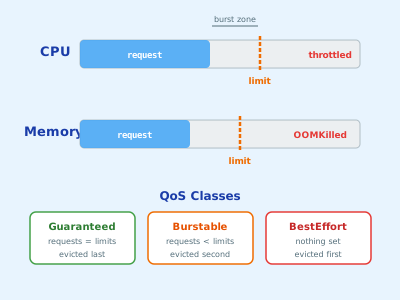
Requests tell the scheduler where to place your pod. Limits tell the runtime when to stop it.
Estimated Reading Time : 8m
Requests vs limits
Every container in a pod can specify two values for CPU and memory:
Request — the amount of resource the container is guaranteed. The scheduler uses this to decide which node to place the pod on. A node will only accept the pod if it has enough unallocated capacity to satisfy the request.
Limits — the maximum amount of resource the container is allowed to use. What happens when it exceeds the limit depends on the resource type.
resources:
  requests:
    cpu: "250m"
    memory: "128Mi"
  limits:
    cpu: "500m"
    memory: "256Mi"
CPU is measured in millicores — 250m is a quarter of a CPU core. Memory uses binary suffixes: Mi (mebibytes, 1 Mi = 1,048,576 bytes) and Gi (gibibytes, 1 Gi = 1,073,741,824 bytes). These are the base-2 equivalents of MB and GB. Common values are 128Mi, 256Mi, 512Mi, and 1Gi.
How CPU limits work
CPU is a compressible resource. When a container exceeds its CPU limit, Kubernetes throttles it — it gets less CPU time but keeps running. No crash, no restart. Just slower.
This makes CPU limits easy to get wrong. A container that’s consistently hitting its CPU limit will appear healthy but perform poorly. The symptom is high latency and slow response times with no obvious error in logs.
If you’re not sure what CPU limit to set, start without one and profile actual usage under load. Then set the limit with headroom above the observed peak.
How memory limits work
Memory is not compressible. When a container exceeds its memory limit, the kernel kills it with an OOMKill (Out Of Memory Kill), and Kubernetes restarts it.
An OOMKilled pod shows up in kubectl describe pod like this:
Last State: Terminated
  Reason: OOMKilled
  Exit Code: 137
Exit code 137 is the standard signal for a process killed by SIGKILL following an OOM event.
Memory leaks and unbounded caches are the most common causes. Set your memory limit above the expected working set, and monitor for gradual growth over time.
QoS classes
Kubernetes assigns each pod a Quality of Service class based on how requests and limits are configured. This affects which pods get evicted first when a node runs out of resources.
Guaranteed — every container in the pod has requests equal to limits for both CPU and memory. These pods are evicted last.
resources:
  requests:
    cpu: "500m"
    memory: "256Mi"
  limits:
    cpu: "500m"
    memory: "256Mi"
Burstable — at least one container has a request lower than its limit, or only requests are set. Evicted after BestEffort.
BestEffort — no requests or limits set at all. Evicted first. Never use this in production.
Setting values
The right values come from profiling, not guessing. A few approaches:
Start with no limits, observe, then set. Deploy with only requests configured, run under realistic load, and check actual usage with kubectl top pods. Use the observed peak as the baseline for your limit.
Use the Vertical Pod Autoscaler in recommendation mode. VPA can observe your workloads over time and suggest request and limit values without automatically applying them.
Check your runtime metrics. If you’re already exporting metrics, CPU usage and memory RSS are the numbers you want.
For memory specifically: set the limit at least 20–30% above the observed peak to account for spikes. A container that’s tuned too tightly will OOMKill under normal load variation.
Common mistakes
No limits set. A runaway process — memory leak, infinite loop, unthrottled goroutines — can consume all resources on a node, evicting other workloads. Always set limits in production.
Requests equal to limits for everything. This gives you Guaranteed QoS but wastes capacity. If a container rarely uses its full request, you’re paying for resources that sit idle. Burstable is often the right tradeoff.
CPU limit too low. A CPU limit that’s too tight will throttle your service even when the node has spare capacity. The node-level CPU might be 20% utilized while your container is throttled at 500m. Watch for container_cpu_throttled_seconds_total in your metrics.
Not setting requests at all. Without requests, the scheduler places pods without any guarantee of available resources. You’ll get unpredictable performance and more frequent evictions.