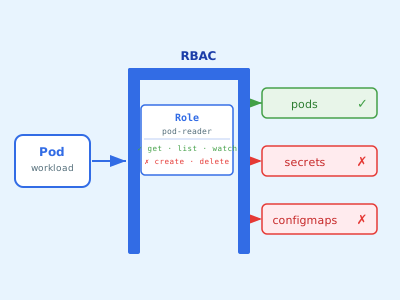
Most people ignore Kubernetes RBAC until something breaks or something gets compromised. Don’t be that person.
Estimated Reading Time : 9m
What RBAC is
RBAC stands for Role-Based Access Control. In Kubernetes, it’s the mechanism that controls who can do what to which resources in the cluster.
Out of the box, if you’re the cluster admin, you can do everything. But workloads running inside the cluster, CI systems deploying to it, and developers on your team all need scoped access — not full admin.
RBAC is how you define and enforce those boundaries.
The four building blocks
Role — defines a set of permissions within a specific namespace. Permissions are always additive; there’s no deny.
ClusterRole — same as a Role but cluster-wide. Use this for non-namespaced resources (nodes, persistent volumes) or when you need the same permissions across all namespaces.
RoleBinding — attaches a Role (or ClusterRole) to a subject within a namespace.
ClusterRoleBinding — attaches a ClusterRole to a subject cluster-wide.
Subjects can be a User, a Group, or a ServiceAccount.
A simple example
Say you have a monitoring service that needs to read pod metrics but shouldn’t be able to modify anything.
First, create a ServiceAccount for it:
apiVersion: v1
kind: ServiceAccount
metadata:
  name: monitor
  namespace: monitoring
Then a Role that allows reading pods:
apiVersion: rbac.authorization.k8s.io/v1
kind: Role
metadata:
  name: pod-reader
  namespace: monitoring
rules:
  - apiGroups: [""]
    resources: ["pods"]
    verbs: ["get", "list", "watch"]
Then bind the Role to the ServiceAccount:
apiVersion: rbac.authorization.k8s.io/v1
kind: RoleBinding
metadata:
  name: monitor-pod-reader
  namespace: monitoring
subjects:
  - kind: ServiceAccount
    name: monitor
    namespace: monitoring
roleRef:
  kind: Role
  name: pod-reader
  apiGroup: rbac.authorization.k8s.io
The monitoring service can now read pods in the monitoring namespace. Nothing else.
When to use ClusterRole vs Role
Use a Role when:
- The workload only needs access in one namespace
- You want explicit namespace-level isolation
Use a ClusterRole when:
- You need access to cluster-scoped resources (nodes, namespaces, PVs)
- You want to define a role once and reuse it across namespaces via multiple RoleBindings
You can bind a ClusterRole with a RoleBinding — this scopes the ClusterRole’s permissions to a single namespace. It’s a useful pattern for defining standard roles once and applying them per-namespace.
ServiceAccounts for workloads
Every pod gets a ServiceAccount. If you don’t specify one, it uses the default ServiceAccount in its namespace. By default, the default ServiceAccount has no special permissions — but that can change if someone binds a role to it, which affects all pods in that namespace that don’t explicitly set a ServiceAccount.
Always create dedicated ServiceAccounts for workloads with specific access needs:
spec:
  serviceAccountName: monitor
This keeps permissions explicit and auditable.
Verifying access
kubectl auth can-i is your friend. Use it to verify what a subject can and can’t do before and after applying RBAC rules:
# Can the monitor ServiceAccount list pods?
kubectl auth can-i list pods \
  --as=system:serviceaccount:monitoring:monitor \
  -n monitoring

# Can it delete pods?
kubectl auth can-i delete pods \
  --as=system:serviceaccount:monitoring:monitor \
  -n monitoring
Expected output: yes for the first, no for the second.
Common mistakes
Binding to the default ServiceAccount — permissions bleed to all pods in the namespace that don’t specify a ServiceAccount.
Using ClusterRoleBindings when RoleBindings would do — gives cluster-wide access when namespace-scoped access was all that was needed.
Wildcard verbs or resources — verbs: ["*"] or resources: ["*"] is almost never the right call outside of admin roles.
Not auditing existing bindings — over time, bindings accumulate. Periodically review what’s bound to what:
kubectl get rolebindings,clusterrolebindings -A
The mindset
RBAC in Kubernetes follows the same principle as IAM anywhere else: start with nothing, add only what’s needed, bind at the narrowest scope that works. It’s a small investment that makes your cluster significantly harder to compromise and easier to reason about.