A pod that’s running isn’t necessarily a pod that’s ready. Kubernetes uses two separate probes to tell the difference.
Estimated Reading Time : 8m
What each probe does
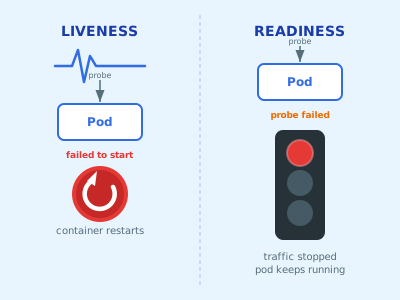
Liveness probe — answers the question: is this container still alive? If it fails, Kubernetes kills the container and restarts it. Use this to recover from deadlocks or corrupted internal state that the process can’t recover from on its own.
Readiness probe — answers the question: is this container ready to serve traffic? If it fails, Kubernetes removes the pod from the Service’s endpoints. The container keeps running — it just stops receiving requests until it passes again.
The distinction matters: a liveness failure triggers a restart, a readiness failure triggers traffic removal. Getting them confused leads to pods that restart unnecessarily or traffic being routed to pods that aren’t ready.
Probe types
All three probe types are available for both liveness and readiness.
HTTP GET — Kubernetes sends a GET request to a specified path and port. A 2xx or 3xx response is a pass, anything else is a failure.
livenessProbe:
  httpGet:
    path: /healthz
    port: 8080
TCP socket — Kubernetes attempts to open a TCP connection. If the port is accepting connections, it passes.
readinessProbe:
  tcpSocket:
    port: 5432
exec — Kubernetes runs a command inside the container. Exit code 0 is success.
livenessProbe:
  exec:
    command:
      - cat
      - /tmp/healthy
Configuration
Every probe shares the same tuning fields:
livenessProbe:
  httpGet:
    path: /healthz
    port: 8080
  initialDelaySeconds: 10   # wait before first probe
  periodSeconds: 10         # how often to probe
  timeoutSeconds: 1         # how long before a probe times out
  failureThreshold: 3       # consecutive failures before action
  successThreshold: 1       # consecutive successes to recover
initialDelaySeconds is the most important one to get right. Set it too low and your liveness probe will kill the container before it finishes starting up.
A practical example
A Go HTTP service with both probes configured:
containers:
  - name: api
    image: myapp:latest
    ports:
      - containerPort: 8080
    livenessProbe:
      httpGet:
        path: /healthz
        port: 8080
      initialDelaySeconds: 15
      periodSeconds: 20
    readinessProbe:
      httpGet:
        path: /ready
        port: 8080
      initialDelaySeconds: 5
      periodSeconds: 10
The /healthz handler returns 200 as long as the process is healthy. The /ready handler additionally checks downstream dependencies and returns 503 if any of them are unavailable:
http.HandleFunc("/healthz", func(w http.ResponseWriter, r *http.Request) {
    w.WriteHeader(http.StatusOK)
})

http.HandleFunc("/ready", func(w http.ResponseWriter, r *http.Request) {
    if err := db.PingContext(r.Context()); err != nil {
        http.Error(w, "db unavailable", http.StatusServiceUnavailable)
        return
    }
    w.WriteHeader(http.StatusOK)
})
Common mistakes
Using the same endpoint for both probes. Liveness and readiness should check different things. A liveness probe that checks the database will restart your pod when the database goes down — even though the pod itself is fine. External dependency checks belong in the readiness probe only.
Setting initialDelaySeconds too low. If your service takes 20 seconds to start and your liveness probe fires at 5, Kubernetes will kill it before it ever comes up. Measure your startup time and add headroom.
Not setting a readiness probe at all. Without one, Kubernetes sends traffic as soon as the container starts — before your server has bound to the port or warmed up. Always define a readiness probe.
Setting failureThreshold too low. A single slow response shouldn’t kill your pod. Give it at least 3 consecutive failures before taking action.
Startup probes
If your application has a long or variable startup time, there’s a third probe worth knowing: startupProbe. Liveness and readiness probes don’t run until the startup probe succeeds. This lets you set tight liveness thresholds for the running application without penalizing slow startup.
startupProbe:
  httpGet:
    path: /healthz
    port: 8080
  failureThreshold: 30
  periodSeconds: 10
This gives the container up to 5 minutes (30 × 10s) to start before the liveness probe takes over.
The mental model
Liveness and readiness answer different questions for different audiences. Liveness is for Kubernetes: should this container be running at all? Readiness is for the load balancer: should this container be receiving traffic right now?
When in doubt: liveness checks the process, readiness checks the dependencies.