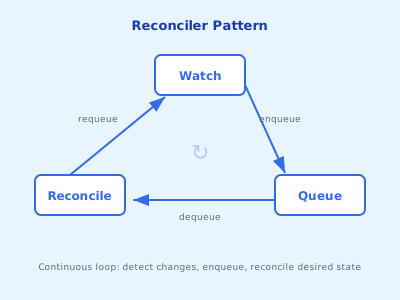
A Kubernetes controller doesn’t respond to events — it reconciles state. That distinction changes how you think about everything.
Estimated Reading Time : 8m
Event-driven vs level-driven
Most systems are event-driven: something happens, you react. A message arrives, you process it. If you miss the message, you miss the work.
Kubernetes controllers are level-driven. They don’t care what happened — they care about the current state versus the desired state. The reconciler’s job is to make reality match intent, every time it runs.
This is the reconciler pattern: observe the world, compare it to what should exist, and take action to close the gap.
The reconcile loop
Every controller follows the same structure:
- Watch — the controller watches one or more resource types for changes
- Queue — when a change is detected, the affected resource’s key (namespace/name) is added to a work queue
- Reconcile — the reconciler pulls a key from the queue, reads the current state, compares it to the desired state, and takes action
- Requeue — if the reconcile can’t complete (e.g., a dependency isn’t ready), it returns a requeue request to try again later
func (r *MyReconciler) Reconcile(ctx context.Context, req ctrl.Request) (ctrl.Result, error) {
    // 1. Fetch the resource
    var myResource v1alpha1.MyResource
    if err := r.Get(ctx, req.NamespacedName, &myResource); err != nil {
        return ctrl.Result{}, client.IgnoreNotFound(err)
    }

    // 2. Observe current state
    // 3. Compare to desired state
    // 4. Take action to close the gap

    return ctrl.Result{}, nil
}
Why this matters
The reconcile loop is inherently self-healing. If your controller crashes and restarts, it doesn’t need to replay missed events — it just reads the current state and reconciles. If someone manually modifies a resource your controller manages, the next reconcile fixes the drift.
This is why controllers are idempotent by design. The same reconcile function might run multiple times for the same resource, and it should produce the same result every time.
The Reconciler interface
controller-runtime defines a single interface:
type Reconciler interface {
    Reconcile(ctx context.Context, req Request) (Result, error)
}
Request contains the namespace and name of the resource that triggered the reconcile. It does not contain the event type (create, update, delete) or the resource itself. You fetch the resource inside the reconciler.
This is intentional — it forces you to write level-driven logic. You don’t branch on “was this a create or an update?” You look at what exists and decide what to do.
Return values
The Result and error return values control what happens next:
// Success — don't requeue
return ctrl.Result{}, nil

// Requeue after a delay — something isn't ready yet
return ctrl.Result{RequeueAfter: 30 * time.Second}, nil

// Requeue immediately — retry right away
return ctrl.Result{Requeue: true}, nil

// Error — controller-runtime logs it and requeues with backoff
return ctrl.Result{}, fmt.Errorf("failed to create deployment: %w", err)
Returning an error triggers exponential backoff. Returning RequeueAfter lets you control the timing. Use RequeueAfter when you’re waiting for something external; return an error when something genuinely failed.
Handling deletes
When a resource is deleted, the Get call inside your reconciler returns a NotFound error. The idiomatic pattern is to treat this as success — the resource is gone, there’s nothing to reconcile:
if err := r.Get(ctx, req.NamespacedName, &myResource); err != nil {
    // Resource was deleted — nothing to do
    return ctrl.Result{}, client.IgnoreNotFound(err)
}
If you need to run cleanup logic before deletion, use finalizers (covered in a later post).
The mental model
Think of reconciliation like a thermostat. It doesn’t care whether the temperature dropped because you opened a window or because the furnace broke. It checks the current temperature, compares it to the target, and turns the heat on or off. Every time. That’s a controller.