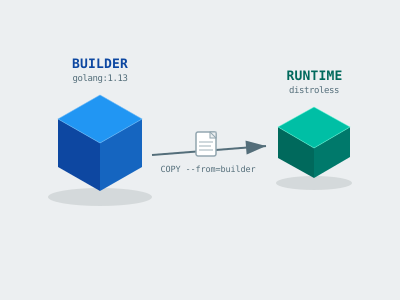
Your Docker image doesn’t need a compiler in production. Here’s how to leave it behind.
Estimated Reading Time : 7m
The problem with single-stage builds
A naive Dockerfile for a Go service might look like this:
FROM golang:1.13

WORKDIR /app
COPY . .
RUN go build -o server ./cmd/server

CMD ["./server"]
This works, but the resulting image ships with the entire Go toolchain — compilers, build cache, source code, and all. That’s hundreds of megabytes you’re pushing to a registry and pulling onto every node, for something that only needs a single binary at runtime.
Multi-stage builds let you separate the build environment from the runtime environment in a single Dockerfile.
How it works
Each FROM instruction starts a new stage. You can copy artifacts from one stage into another. Only the final stage ends up in the image you ship.
Here’s the same Go service with a multi-stage build:
# Stage 1: build
FROM golang:1.13 AS builder

WORKDIR /app
COPY go.mod go.sum ./
RUN go mod download

COPY . .
RUN CGO_ENABLED=0 GOOS=linux go build -o server ./cmd/server

# Stage 2: runtime
FROM gcr.io/distroless/static

WORKDIR /app
COPY --from=builder /app/server .

CMD ["./server"]
The final image is built from distroless/static — no shell, no package manager, just the binary. The Go toolchain never touches it.
Choosing a base image for the runtime stage
The right base image depends on your binary’s dependencies.
gcr.io/distroless/static — for statically compiled binaries with no libc dependency. Ideal for Go with CGO_ENABLED=0. Extremely minimal.
gcr.io/distroless/base — includes glibc. Use this if your binary links against C libraries.
alpine:3 — slightly larger than distroless but gives you a shell and apk for debugging. Useful during development or if you need to run shell scripts in the container.
scratch — an empty image. Smallest possible, but requires a fully static binary and no timezone data or SSL certificates unless you copy them in explicitly.
For most Go services, distroless/static is the sweet spot.
Caching dependencies
One detail worth getting right is layer caching. Docker caches each layer and only rebuilds from the point where something changed.
If you copy your entire source tree before downloading dependencies, any source change invalidates the dependency cache:
# Bad: cache busted on every source change
COPY . .
RUN go mod download
Copy only the module files first, download dependencies, then copy the rest of the source:
# Good: dependencies cached independently of source changes
COPY go.mod go.sum ./
RUN go mod download

COPY . .
RUN go build ...
This makes incremental builds significantly faster.
A realistic example with build args
Sometimes you want to parameterize the build — for example, embedding a version string:
FROM golang:1.13 AS builder

ARG VERSION=dev

WORKDIR /app
COPY go.mod go.sum ./
RUN go mod download

COPY . .
RUN CGO_ENABLED=0 GOOS=linux go build \
    -ldflags="-X main.version=${VERSION}" \
    -o server ./cmd/server

FROM gcr.io/distroless/static

WORKDIR /app
COPY --from=builder /app/server .

CMD ["./server"]
Build with:
docker build --build-arg VERSION=1.4.2 -t myapp:1.4.2 .
How much smaller are we talking?
For a typical Go service:
| Approach | Image size |
|---|---|
golang:1.13 (single stage) |
~900MB |
alpine (single stage) |
~350MB |
Multi-stage + distroless/static |
~10–20MB |
That’s not a rounding error. Smaller images mean faster pulls, less storage, and a smaller attack surface. There’s no reason not to use multi-stage builds for production workloads.