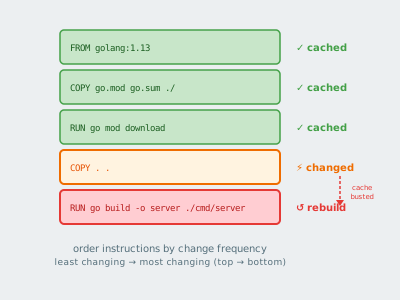
Every instruction in your Dockerfile creates a layer. Change one, and everything after it rebuilds. This isn’t a bug — it’s the mechanism. Learn to use it.
Estimated Reading Time : 7m
How layers work
Docker builds images as a stack of read-only layers. Each instruction in your Dockerfile — FROM, RUN, COPY, ADD, ENV — creates a new layer on top of the previous one.
When you rebuild an image, Docker checks whether each layer has changed. If the layer matches the cached version, it reuses it. If it doesn’t match, Docker rebuilds that layer and every layer above it.
The key rule: a cache miss at any layer invalidates the cache for all subsequent layers.
Instruction order matters
Consider this Dockerfile:
FROM golang:1.13

WORKDIR /app
COPY . .                          # copies entire source tree
RUN go mod download               # downloads dependencies
RUN CGO_ENABLED=0 go build -o server .

CMD ["./server"]
Every time any source file changes, the COPY . . layer is invalidated. That busts the cache for go mod download, which re-downloads all dependencies on every build — even if go.mod and go.sum haven’t changed.
The fix is to copy dependency files first, download, then copy the rest:
FROM golang:1.13

WORKDIR /app
COPY go.mod go.sum ./             # only the module files
RUN go mod download               # cached unless go.mod/go.sum change

COPY . .                          # source changes don't bust the dep cache
RUN CGO_ENABLED=0 go build -o server .

CMD ["./server"]
Now go mod download is only re-run when go.mod or go.sum changes. A typical source edit skips straight to go build.
What triggers cache invalidation
RUN — Docker hashes the command string. If the string is identical, the cache is used. The actual output of the command is not checked, only whether the instruction itself changed.
COPY and ADD — Docker checksums the contents of the files being copied. If any file content changes, the cache is invalidated. This is the most common source of busted caches.
ENV and ARG — Changing an environment variable or build arg invalidates the cache for that layer and everything after it.
FROM — If the base image changes (e.g., a new golang:1.13 is published), the entire cache is invalidated.
ARG placement
ARG values are part of the layer hash. Where you place an ARG relative to other instructions determines how much of the cache it affects:
FROM golang:1.13

# ARG here only affects layers after this point
ARG VERSION=dev

WORKDIR /app
COPY go.mod go.sum ./
RUN go mod download           # not affected by VERSION change

COPY . .
RUN go build -ldflags="-X main.version=${VERSION}" -o server .
If VERSION were declared before go mod download, changing it would bust the dependency cache. Placing it as late as possible minimizes the blast radius.
.dockerignore
Docker sends the entire build context (the directory you point docker build at) to the daemon before processing the Dockerfile. Files in .dockerignore are excluded from this context.
This matters for caching in two ways:
-
Smaller context = faster builds. Sending gigabytes of
node_modulesor build artifacts on every build is avoidable overhead. -
Unnecessary cache busts. If your build context includes files that change frequently but aren’t needed in the image (logs, test output,
.git), every build will invalidateCOPY . .even when your actual source hasn’t changed.
A minimal .dockerignore for a Go service:
.git
*.md
tmp/
Multi-stage builds and caching
Each stage in a multi-stage build has its own cache. The --from copy between stages doesn’t invalidate the source stage’s cache — each stage is cached independently.
FROM golang:1.13 AS builder    # this stage cached separately
WORKDIR /app
COPY go.mod go.sum ./
RUN go mod download
COPY . .
RUN CGO_ENABLED=0 go build -o server .

FROM gcr.io/distroless/static  # this stage only rebuilds if builder output changes
COPY --from=builder /app/server .
CMD ["./server"]
If only the runtime stage changes, the builder stage cache is untouched.
Gotchas
RUN apt-get update should always be paired with apt-get install in the same instruction. Running them separately means apt-get update can be cached with a stale package list while apt-get install picks up new packages. Combine them:
RUN apt-get update && apt-get install -y curl
ADD with a URL always invalidates the cache. Docker can’t know if the remote resource has changed without fetching it. Use RUN curl inside a layer if you need deterministic caching behavior.
Cache is local by default. CI environments start with a cold cache on every run unless you explicitly pull and use a cache image. Use --cache-from to pull a previously built image as the cache source:
docker build --cache-from myapp:latest -t myapp:latest .