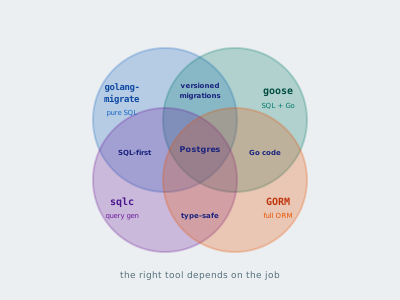
Four tools, four approaches. Here’s how golang-migrate, goose, sqlc, and GORM compare — and when to use each.
Estimated Reading Time : 11m
Why migrations matter
Running ALTER TABLE by hand in production works until it doesn’t. Someone forgets a column, runs the wrong script, or applies changes out of order. Migrations solve this by treating schema changes as versioned, ordered files that are applied sequentially and tracked in the database itself.
A migration system gives you:
- A history of every schema change
- The ability to reproduce any database state from scratch
- Confidence that staging and production have the same schema
- A rollback path when something goes wrong
Go has two popular migration libraries: golang-migrate and goose. They take different approaches, and each has strengths worth understanding.
golang-migrate
github.com/golang-migrate/migrate — a standalone CLI and Go library. Migrations are plain SQL files. No Go code required for the migrations themselves. Supports Postgres, MySQL, SQLite, and others.
Project structure
Migrations live in a directory, one pair of files per change — an “up” file and a “down” file:
migrations/
├── 000001_create_users.up.sql
├── 000001_create_users.down.sql
├── 000002_add_email_to_users.up.sql
├── 000002_add_email_to_users.down.sql
├── 000003_create_orders.up.sql
└── 000003_create_orders.down.sql
The numeric prefix determines the order. The “up” file applies the change. The “down” file reverses it.
Writing migrations
Each migration should do one thing. Don’t combine unrelated changes — if you need to roll back, you want granularity.
000001_create_users.up.sql:
CREATE TABLE users (
    id         SERIAL PRIMARY KEY,
    name       TEXT NOT NULL,
    created_at TIMESTAMPTZ NOT NULL DEFAULT NOW()
);
000001_create_users.down.sql:
DROP TABLE IF EXISTS users;
000002_add_email_to_users.up.sql:
ALTER TABLE users ADD COLUMN email TEXT UNIQUE;
000002_add_email_to_users.down.sql:
ALTER TABLE users DROP COLUMN IF EXISTS email;
Running from Go
package main

import (
    "log"

    "github.com/golang-migrate/migrate/v4"
    _ "github.com/golang-migrate/migrate/v4/database/postgres"
    _ "github.com/golang-migrate/migrate/v4/source/file"
)

func main() {
    m, err := migrate.New(
        "file://migrations",
        "postgres://localhost:5432/myapp?sslmode=disable",
    )
    if err != nil {
        log.Fatal(err)
    }

    if err := m.Up(); err != nil && err != migrate.ErrNoChange {
        log.Fatal(err)
    }

    log.Println("migrations applied")
}
m.Up() applies all pending migrations in order. If the database is already up to date, it returns migrate.ErrNoChange.
Running from the CLI
# Install
go install -tags 'postgres' github.com/golang-migrate/migrate/v4/cmd/migrate@latest

# Apply all pending migrations
migrate -path migrations -database "postgres://localhost:5432/myapp?sslmode=disable" up

# Roll back the last migration
migrate -path migrations -database "postgres://localhost:5432/myapp?sslmode=disable" down 1

# Check current version
migrate -path migrations -database "postgres://localhost:5432/myapp?sslmode=disable" version
How tracking works
golang-migrate creates a schema_migrations table with two columns: version (the migration number) and dirty (whether the last migration failed partway through).
SELECT * FROM schema_migrations;

 version | dirty
---------+-------
       3 | f
This tells you migration 3 is the latest applied migration and it completed cleanly.
When migrations go wrong
A migration that fails halfway through leaves the database in a dirty state. The dirty flag is set to true, and subsequent runs refuse to proceed until you fix it.
To recover:
- Check what actually got applied — look at the database schema directly
- Fix the issue manually if needed
- Force the version to the last known good state:
migrate -path migrations -database "..." force 2
This sets the version to 2 and clears the dirty flag without running any SQL.
Embedding migrations
For self-contained binaries, use Go’s embed package so you don’t need to deploy migration files alongside the binary:
import "embed"

//go:embed migrations/*.sql
var migrations embed.FS
Then use the iofs source driver:
import "github.com/golang-migrate/migrate/v4/source/iofs"

source, err := iofs.New(migrations, "migrations")
if err != nil {
    log.Fatal(err)
}

m, err := migrate.NewWithSourceInstance("iofs", source,
    "postgres://localhost:5432/myapp?sslmode=disable")
goose
github.com/pressly/goose — supports both SQL and Go-based migrations. The Go migration support is what sets it apart — when a schema change requires data transformation that’s awkward in raw SQL, you can write the migration in Go.
SQL migrations
goose uses a single file per migration with -- +goose Up and -- +goose Down annotations instead of separate up/down files:
-- +goose Up
CREATE TABLE users (
    id         SERIAL PRIMARY KEY,
    name       TEXT NOT NULL,
    created_at TIMESTAMPTZ NOT NULL DEFAULT NOW()
);

-- +goose Down
DROP TABLE IF EXISTS users;
Go-based migrations
This is where goose shines. Say you need to split a full_name column into first_name and last_name — that requires reading every row, parsing the name, and writing back two columns. Pure SQL can handle simple cases with split_part, but Go gives you full control:
package migrations

import (
    "context"
    "database/sql"
    "strings"

    "github.com/pressly/goose/v3"
)

func init() {
    goose.AddMigrationContext(upSplitName, downSplitName)
}

func upSplitName(ctx context.Context, tx *sql.Tx) error {
    // Add the new columns
    if _, err := tx.ExecContext(ctx, `
        ALTER TABLE users ADD COLUMN first_name TEXT;
        ALTER TABLE users ADD COLUMN last_name TEXT;
    `); err != nil {
        return err
    }

    // Backfill from existing data
    rows, err := tx.QueryContext(ctx, "SELECT id, full_name FROM users")
    if err != nil {
        return err
    }
    defer rows.Close()

    for rows.Next() {
        var id int
        var fullName string
        if err := rows.Scan(&id, &fullName); err != nil {
            return err
        }

        parts := strings.SplitN(fullName, " ", 2)
        first := parts[0]
        last := ""
        if len(parts) > 1 {
            last = parts[1]
        }

        if _, err := tx.ExecContext(ctx,
            "UPDATE users SET first_name = $1, last_name = $2 WHERE id = $3",
            first, last, id,
        ); err != nil {
            return err
        }
    }

    return rows.Err()
}

func downSplitName(ctx context.Context, tx *sql.Tx) error {
    _, err := tx.ExecContext(ctx, `
        ALTER TABLE users DROP COLUMN IF EXISTS first_name;
        ALTER TABLE users DROP COLUMN IF EXISTS last_name;
    `)
    return err
}
The entire migration runs inside a transaction. If anything fails, the schema changes and the data backfill are both rolled back.
Running from the CLI
# Apply all pending migrations
goose -dir migrations postgres "postgres://localhost:5432/myapp?sslmode=disable" up

# Roll back the last migration
goose -dir migrations postgres "postgres://localhost:5432/myapp?sslmode=disable" down

# Check status
goose -dir migrations postgres "postgres://localhost:5432/myapp?sslmode=disable" status
Embedding migrations
goose also supports embedded migrations. For SQL migrations, use embed.FS directly with the goose provider:
import (
    "embed"

    "github.com/pressly/goose/v3"
)

//go:embed migrations/*.sql
var migrations embed.FS

func main() {
    goose.SetBaseFS(migrations)

    if err := goose.SetDialect("postgres"); err != nil {
        log.Fatal(err)
    }

    db, err := sql.Open("postgres", "postgres://localhost:5432/myapp?sslmode=disable")
    if err != nil {
        log.Fatal(err)
    }

    if err := goose.Up(db, "migrations"); err != nil {
        log.Fatal(err)
    }
}
For Go-based migrations, embedding works differently — since Go migrations are registered via init() functions, you just need to import the package that contains them:
import _ "myapp/migrations" // init() registers the Go migrations
The Go migrations are compiled into the binary automatically. Combine this with SetBaseFS for the SQL migrations and your binary handles both types without any external files.
Bonus: sqlc for type-safe queries
sqlc (github.com/sqlc-dev/sqlc) isn’t a migration tool — it’s a query compiler. You write SQL queries, and sqlc generates type-safe Go code from them. It pairs well with either golang-migrate or goose.
How it works
You write your schema and queries in SQL. sqlc reads them and generates Go structs, interfaces, and functions — no reflection, no runtime SQL parsing.
sqlc.yaml:
version: "2"
sql:
  - engine: "postgresql"
    queries: "queries/"
    schema: "migrations/"
    gen:
      go:
        package: "db"
        out: "internal/db"
sqlc reads your migration files directly for the schema, so it stays in sync with your actual database structure.
queries/users.sql:
-- name: GetUser :one
SELECT id, name, email, created_at
FROM users
WHERE id = $1;

-- name: ListUsers :many
SELECT id, name, email, created_at
FROM users
ORDER BY created_at DESC;

-- name: CreateUser :one
INSERT INTO users (name, email)
VALUES ($1, $2)
RETURNING id, name, email, created_at;

-- name: DeleteUser :exec
DELETE FROM users WHERE id = $1;
The comment annotations tell sqlc what to generate:
:one— returns a single row:many— returns a slice:exec— returns only an error
Generated code
Run sqlc generate and it produces Go code you never have to write or maintain:
// internal/db/models.go (generated)
type User struct {
    ID        int32
    Name      string
    Email     sql.NullString
    CreatedAt time.Time
}

// internal/db/users.sql.go (generated)
func (q *Queries) GetUser(ctx context.Context, id int32) (User, error) { ... }
func (q *Queries) ListUsers(ctx context.Context) ([]User, error) { ... }
func (q *Queries) CreateUser(ctx context.Context, arg CreateUserParams) (User, error) { ... }
func (q *Queries) DeleteUser(ctx context.Context, id int32) error { ... }
Using the generated code
queries := db.New(conn)

user, err := queries.CreateUser(ctx, db.CreateUserParams{
    Name:  "Alice",
    Email: sql.NullString{String: "alice@example.com", Valid: true},
})
if err != nil {
    return err
}

fmt.Println(user.ID, user.Name)
No hand-written Scan calls, no mismatched column types discovered at runtime. If your query references a column that doesn’t exist in the schema, sqlc generate fails at build time — not at 3am in production.
Why it pairs well with migrations
sqlc reads your migration files as the source of truth for the schema. When you add a migration that alters a table, re-run sqlc generate and the Go code updates automatically. If any queries are now invalid — referencing a dropped column, wrong types — the code generation fails immediately.
The workflow becomes:
- Write a migration (golang-migrate or goose)
- Write or update your SQL queries
- Run
sqlc generate - The compiler catches any mismatches
GORM
gorm.io/gorm — a full-featured ORM for Go. Unlike the other tools in this post, GORM handles migrations, queries, relationships, and hooks in a single package. You define your schema as Go structs and GORM manages the rest.
Defining models
type User struct {
    gorm.Model
    Name   string
    Email  string `gorm:"uniqueIndex"`
    Orders []Order
}

type Order struct {
    gorm.Model
    UserID uint
    Amount float64
    Status string
}
gorm.Model embeds ID, CreatedAt, UpdatedAt, and DeletedAt fields automatically. The DeletedAt field enables soft deletes — db.Delete(&user) sets the timestamp rather than removing the row.
AutoMigrate
GORM can create and alter tables to match your struct definitions:
db, err := gorm.Open(postgres.Open("postgres://localhost:5432/myapp"), &gorm.Config{})
if err != nil {
    log.Fatal(err)
}

db.AutoMigrate(&User{}, &Order{})
AutoMigrate creates tables if they don’t exist, adds missing columns, and creates indexes. It will not delete columns, change column types, or drop tables. This makes it safe for development but insufficient for production schema management — you’ll still want a migration tool for destructive or complex changes.
CRUD operations
// Create
user := User{Name: "Alice", Email: "alice@example.com"}
db.Create(&user) // user.ID is populated after insert

// Read
var u User
db.First(&u, 1)                                  // by primary key
db.Where("email = ?", "alice@example.com").First(&u) // by condition

// Update
db.Model(&u).Update("name", "Alice Smith")
db.Model(&u).Updates(User{Name: "Alice Smith", Email: "alice@corp.com"})

// Delete (soft delete — sets deleted_at)
db.Delete(&u)
Relationships and preloading
GORM handles associations through struct tags and conventions:
// Load a user with all their orders
var user User
db.Preload("Orders").First(&user, 1)

fmt.Println(user.Orders) // populated
Without Preload, accessing user.Orders would be empty. This is explicit — GORM doesn’t lazy-load by default, which avoids the N+1 problem that plagues many ORMs.
Transactions
err := db.Transaction(func(tx *gorm.DB) error {
    if err := tx.Create(&order).Error; err != nil {
        return err // triggers rollback
    }

    if err := tx.Model(&account).Update("balance", gorm.Expr("balance - ?", order.Amount)).Error; err != nil {
        return err // triggers rollback
    }

    return nil // commits
})
Raw SQL
When the ORM abstraction gets in the way, drop down to raw SQL:
var users []User
db.Raw("SELECT * FROM users WHERE created_at > ?", lastWeek).Scan(&users)

db.Exec("UPDATE users SET status = ? WHERE last_login < ?", "inactive", cutoff)
The tradeoff and why I don’t use Gorm
GORM gives you the fastest path from “I have a Go struct” to “I have a working database layer.” For prototyping and CRUD-heavy applications, this is valuable.
The cost is abstraction. Complex queries often fight the ORM — you end up chaining methods that are harder to read than the equivalent SQL. Debug output shows generated SQL, but you’re always one layer removed from what actually runs. And AutoMigrate is convenient in development but doesn’t give you versioned, reversible migrations.
Choosing the right tool
golang-migrate — pure SQL migrations. Minimal, no opinions about your Go code. Best when you want full control over your schema and queries.
goose — SQL and Go-based migrations. Choose this when schema changes sometimes require data transformations in Go, or when you prefer single-file migrations.
sqlc — generates type-safe Go code from SQL queries. Not a migration tool — pair it with golang-migrate or goose. Best when you want to write SQL directly but still get compile-time safety.
GORM — full ORM with auto-migration, CRUD helpers, relationships, and hooks. Best for rapid development and CRUD-heavy applications where you’d rather work with Go structs than write SQL.
These aren’t mutually exclusive. A common production stack is goose + sqlc — goose for schema changes, sqlc for type-safe queries. Another is golang-migrate + GORM — versioned migrations for schema control with GORM for the query layer (skipping AutoMigrate in production). Pick the combination that fits your team and your workload.
Personally, I reach for goose + sqlc. Goose gives me Go-based migrations when I need them, and sqlc lets me write real SQL while still getting compile-time safety. I’d rather write SQL and have Go code generated than write Go code that generates SQL.
Tips for writing safe migrations
Always include a down migration. Even if you think you’ll never roll back. The one time you need it, you’ll be glad it exists.
Don’t modify existing migrations. Once a migration has been applied to any environment, treat it as immutable. If you need to change something, write a new migration.
Use transactions where possible. Wrap DDL statements in a transaction so failures roll back cleanly. Postgres supports transactional DDL for most operations:
BEGIN;
ALTER TABLE users ADD COLUMN phone TEXT;
CREATE INDEX idx_users_phone ON users (phone);
COMMIT;
Be careful with large tables. Adding a column with a default value on a table with millions of rows can lock the table for the duration. In Postgres 11+, ADD COLUMN ... DEFAULT is fast because it stores the default in the catalog rather than rewriting every row. On older versions, add the column as nullable first, then backfill in batches.
Test migrations against a copy of production data. A migration that works on an empty dev database might fail or lock up on a table with 50 million rows.