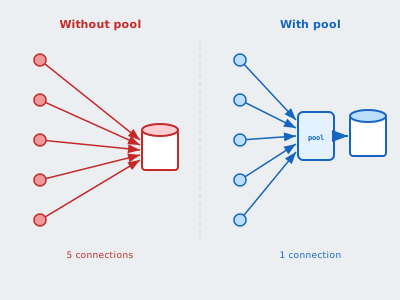
Opening a database connection is expensive. Opening one per request is a problem. Opening one per query is a disaster.
Estimated Reading Time : 9m
The cost of a connection
Every time your application connects to Postgres, the database forks a new backend process. That involves:
- A TCP handshake (plus TLS if encrypted)
- Authentication
- Process creation on the database server
- Memory allocation for the session
A single connection setup can take 5–20ms. At 100 requests per second, that’s up to 2 full seconds per second spent just connecting. And each idle connection holds memory on the database server — typically 5–10MB per connection.
Most databases have a hard limit on concurrent connections. Postgres defaults to 100. Once you hit it, new connections are rejected.
What a connection pool does
A connection pool maintains a set of open, reusable connections. Instead of opening a new connection for every request, your application borrows one from the pool, uses it, and returns it.
The pool handles:
- Keeping connections alive and healthy
- Limiting the total number of connections
- Queueing requests when all connections are in use
- Closing idle connections that haven’t been used recently
Go’s built-in pool: sql.DB
database/sql includes a connection pool out of the box. When you call sql.Open, you’re not opening a single connection — you’re creating a pool.
db, err := sql.Open("postgres", "postgres://localhost:5432/myapp?sslmode=disable")
if err != nil {
    log.Fatal(err)
}

// Configure the pool
db.SetMaxOpenConns(25)       // max connections open at once
db.SetMaxIdleConns(10)       // max connections kept idle
db.SetConnMaxLifetime(5 * time.Minute)  // max time a connection is reused
db.SetConnMaxIdleTime(1 * time.Minute)  // max time a connection sits idle
What each setting does
MaxOpenConns — the ceiling. No more than this many connections will be open simultaneously. If all connections are in use, the next query blocks until one is returned. Set this based on your database’s connection limit divided by the number of application instances.
MaxIdleConns — how many connections to keep ready when they’re not in use. Too low and you’re constantly opening new connections. Too high and you’re holding memory on the database server for no reason.
ConnMaxLifetime — the maximum time a connection can be reused before it’s closed and replaced. This prevents long-lived connections from accumulating stale state or holding onto server resources indefinitely. Useful when connecting through a load balancer or proxy.
ConnMaxIdleTime — how long an idle connection sits in the pool before it’s closed. Helps shed connections during low-traffic periods.
A reasonable starting point
db.SetMaxOpenConns(25)
db.SetMaxIdleConns(5)
db.SetConnMaxLifetime(5 * time.Minute)
db.SetConnMaxIdleTime(30 * time.Second)
Then monitor and adjust. If you see db.Stats().WaitCount climbing, your pool is too small. If db.Stats().Idle is consistently near MaxIdleConns, you can lower it.
When sql.DB isn’t enough: PgBouncer
Go’s built-in pool is per-process. If you have 10 application instances each with MaxOpenConns(25), that’s 250 connections to Postgres — potentially more than the database can handle.
PgBouncer sits between your application and the database as a lightweight connection proxy. All application instances connect to PgBouncer, and PgBouncer maintains a smaller pool of actual database connections.
┌─────────┐
│  App 1  │──┐
└─────────┘  │    ┌───────────┐    ┌──────────┐
┌─────────┐  ├───▶│ PgBouncer │───▶│ Postgres │
│  App 2  │──┤    └───────────┘    └──────────┘
└─────────┘  │      20 conns         max 100
┌─────────┐  │
│  App 3  │──┘
└─────────┘
  25 each = 75 client conns
Pool modes
PgBouncer supports three pooling modes:
Transaction pooling — a connection is assigned for the duration of a transaction, then returned. This is the most efficient mode and works for the majority of applications.
Session pooling — a connection is assigned for the entire client session. Behaves like a normal connection pool. Less efficient but supports session-level features like SET commands and prepared statements.
Statement pooling — a connection is assigned per statement. The most aggressive mode, but breaks multi-statement transactions. Rarely used.
Transaction pooling is the default and the right choice unless you have a specific reason for session pooling.
Basic PgBouncer config
[databases]
myapp = host=localhost port=5432 dbname=myapp

[pgbouncer]
listen_addr = 0.0.0.0
listen_port = 6432
auth_type = md5
auth_file = /etc/pgbouncer/userlist.txt
pool_mode = transaction
max_client_conn = 200
default_pool_size = 20
Your applications connect to PgBouncer on port 6432 instead of Postgres on 5432. PgBouncer maintains only 20 actual connections to Postgres regardless of how many clients connect.
PgBouncer gotchas
Prepared statements don’t work in transaction mode. Postgres prepared statements are session-scoped. In transaction pooling mode, consecutive queries might use different backend connections, so a statement prepared on one connection won’t exist on the next. Use simple_query protocol or switch to session pooling if you need prepared statements.
Session-level state is lost between transactions. SET search_path, SET timezone, or any other session configuration won’t persist across transactions in transaction pooling mode. Set these per-transaction or use connection parameters in the connection string.
LISTEN/NOTIFY requires session mode. If your application uses Postgres pub/sub, those subscriptions are session-scoped and won’t work with transaction pooling.
Cloud-managed alternatives
If you’re on GCP, Cloud SQL Proxy handles connection management and authentication for Cloud SQL instances. It provides encrypted tunnels and IAM-based auth without running PgBouncer yourself.
On AWS, RDS Proxy provides similar functionality — a managed connection pool between your application and RDS or Aurora.
Both are drop-in replacements for running your own PgBouncer, with the tradeoff of less configurability.
The mental model
Think of it as three layers:
- Application pool (
sql.DB) — limits connections per process - Connection proxy (PgBouncer / Cloud SQL Proxy) — limits connections across all processes
- Database (Postgres
max_connections) — the hard ceiling
Layer 1 is always there in Go. Layer 2 becomes necessary when you scale beyond a few application instances. Layer 3 is what you’re protecting.
The goal is to keep layer 3 well below its limit while still giving your application enough concurrency to serve traffic. A well-tuned pool means your database handles the connections it’s good at, and your application doesn’t waste time opening connections it doesn’t need.