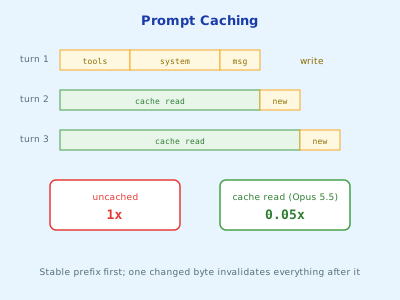
Every turn of an agent re-sends the whole conversation. Prompt caching lets you pay full price for that prefix once, then a fraction of it on every turn after.
Estimated Reading Time : 8m
The problem
The model API is stateless. On turn twenty of an agent loop, you send the system prompt, every tool definition, and nineteen turns of history, all over again. Most of those tokens are identical to the previous request.
Without caching, you pay full input price for all of them, every time, and the model re-processes them every time, which adds latency.
How caching works
You mark a point in the request with a cache breakpoint. The API stores everything before that point. On the next request, if the bytes up to the breakpoint are identical, it reads them from the cache instead of reprocessing them.
The key word is identical. The cache is a prefix match. One changed byte anywhere in the prefix invalidates everything after it.
Requests are assembled in a fixed order:
tools -> system -> messages
So the stable parts should come first, and anything that changes per request should come last.
The economics
For Claude Opus 5.5, with a base input price of $4 per million tokens:
| Price per MTok | Relative to base | |
|---|---|---|
| Uncached input | $4.00 | 1x |
| Cache write, 5-minute TTL | $5.00 | 1.25x |
| Cache write, 1-hour TTL | $8.00 | 2x |
| Cache read | $0.20 | 0.05x |
A 5-minute cache pays for itself on the second request. Here’s a realistic example: an agent with a 20,000-token system prompt and tool set, handling 1,000 requests that arrive less than five minutes apart.
- Uncached: 1,000 x 20,000 tokens x $4/MTok = $80
- Cached: one write at $0.10, then 999 reads at $0.004 each = about $4.10
Latency drops too, because cached tokens don’t need to be processed again.
Adding a breakpoint in Go
The simplest version puts one breakpoint on the system prompt. Because tools render before the system prompt, this caches both:
params := anthropic.MessageNewParams{
    Model:     "claude-opus-5-5",
    MaxTokens: 16000,
    Tools:     tools,
    System: []anthropic.TextBlockParam{{
        Text:         systemPrompt,
        CacheControl: anthropic.NewCacheControlEphemeralParam(),
    }},
    Messages: messages,
}
NewCacheControlEphemeralParam() uses the default 5-minute TTL. Each cache hit resets the timer, so steady traffic keeps the entry warm indefinitely.
For agent loops, where the history grows every turn, you want the cache to move forward with the conversation. Setting CacheControl on the request itself places the breakpoint on the last cacheable block automatically:
params.CacheControl = anthropic.NewCacheControlEphemeralParam()
Each turn then reads everything up to the previous turn from cache and only writes the new part.
You can use up to four breakpoints per request. There’s also a minimum size: on Claude Opus 5.5, prefixes under 512 tokens don’t cache. They don’t fail, they just quietly don’t cache.
Choosing a TTL
Pick the TTL by the gap between requests that share a prefix:
- Under 5 minutes (agent loops, steady traffic): use the default. Every request refreshes it.
- 5 to 60 minutes (a user who replies after a coffee break): the 1-hour TTL is worth its higher write price.
- Over an hour: neither helps much. Accept the cold start.
CacheControl: anthropic.CacheControlEphemeralParam{TTL: anthropic.CacheControlEphemeralTTLTTL1h},
Verify it, then keep verifying
Caching fails silently. Requests still succeed. The bill is just higher. The Usage field on every response is the only ground truth:
u := resp.Usage
log.Printf("input=%d cache_write=%d cache_read=%d",
    u.InputTokens, u.CacheCreationInputTokens, u.CacheReadInputTokens)
Two things trip people up:
InputTokensis only the uncached remainder. The full prompt size isInputTokens + CacheCreationInputTokens + CacheReadInputTokens.- A healthy loop reads a lot and writes a little.
CacheReadInputTokensshould grow turn over turn, whileCacheCreationInputTokensstays roughly the size of the last turn.
Most caching bugs are regressions. Caching works when you set it up, then months later someone adds a timestamp to the system prompt and nobody notices. I like to pin it down with an integration test:
func TestPromptIsCached(t *testing.T) {
    if os.Getenv("ANTHROPIC_API_KEY") == "" {
        t.Skip("needs ANTHROPIC_API_KEY")
    }
    client := anthropic.NewClient()
    params := buildParams("ping") // the same code path production uses

    if _, err := client.Messages.New(context.Background(), params); err != nil {
        t.Fatal(err)
    }
    resp, err := client.Messages.New(context.Background(), params)
    if err != nil {
        t.Fatal(err)
    }
    if resp.Usage.CacheReadInputTokens == 0 {
        t.Fatal("second identical request did not read from the cache")
    }
}
Silent invalidators
These are the bugs I’ve seen most often, all of which change the prefix on every request:
| Pattern | Fix |
|---|---|
time.Now() formatted into the system prompt |
Put the date in the latest user message instead |
| Tools built by ranging over a map | Keep tools in a slice, in a fixed order |
| User or session IDs in the system prompt | Move them after the last breakpoint |
if flag { system += "..." } |
Every flag combination is a separate cache. Keep the system prompt fixed. |
| Per-user tool sets | Give everyone the same tools and enforce permissions inside the tool |
When the numbers look wrong, log two consecutive request bodies and diff them. The first difference in the shared prefix is your invalidator.
Wrapping up
Put stable content first and volatile content last, add a breakpoint, and let the cache carry the prefix from turn to turn. Then measure it: the Usage fields tell you whether caching works, and a test that asserts a cache hit keeps it working. For agents, which resend the same prefix dozens of times per task, it’s the single biggest cost lever you have.